
Download NCVT ITI Admit Card 2026 1st & 2nd Year Hall Ticket Out
The NCVT MIS ITI Admit Card 2026 is now available for download on the official SIDH portal. It is mandatory for all candidates who appearing for the upcoming ITI practical and CBT exams scheduled between July 06 and August 03, 2026. The hall ticket includes crucial details like exam date, center, shift timing, and roll number.

This guide provides the latest updates, key dates, and a quick step-by-step process to download your ITI admit card. Make sure to check your details and print the hall ticket well in advance to avoid last-minute issues.
Quick Overview of NCVT ITI Admit Card 2026
Board Name
National Council of Vocational Training (NCVT)
Name of the Exam
ITI (Industrial Training Institute)
Practical Exam Admit Card
06 to 10 July 2026
CBT Exam Admit Card
03 July 2026
Practical Exam Dates
06 to 10 July 2026
CBT Exam Dates
09 July to 03 August 2026
Blog Category
Admit Card
Exam Type
CBT & Practical Exams 2026
Required Details to Download
Registration no, Father name, Date of Birth
Official NCVT Website
Official Skill India Portal
Result Releasing In:
ITI Trainee Login
How to download the NCVT ITI Admit Card 2026?
Option 1: Download through Skill India Digital Portal (SIDH)
The Government of India has introduced the Skill India Digital Portal (www.skillindiadigital.gov.in), making it easier for 1st and 2nd-year ITI students to download their admit cards online. To access their hall ticket, candidates need to visit the portal, navigate to the login section on the homepage, and enter the required details such as PRN number or date of birth to proceed with the download.
Step 1: Visit the official Skill India Digital Portal by opening www.skillindiadigital.gov.in in your browser.
Step 2: On the homepage, locate the Login section and click on it to proceed.
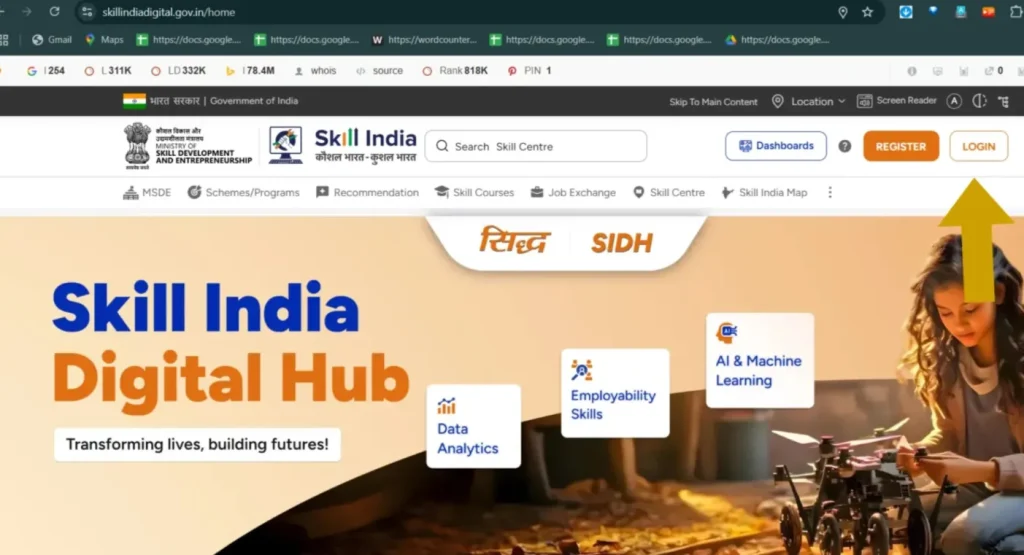
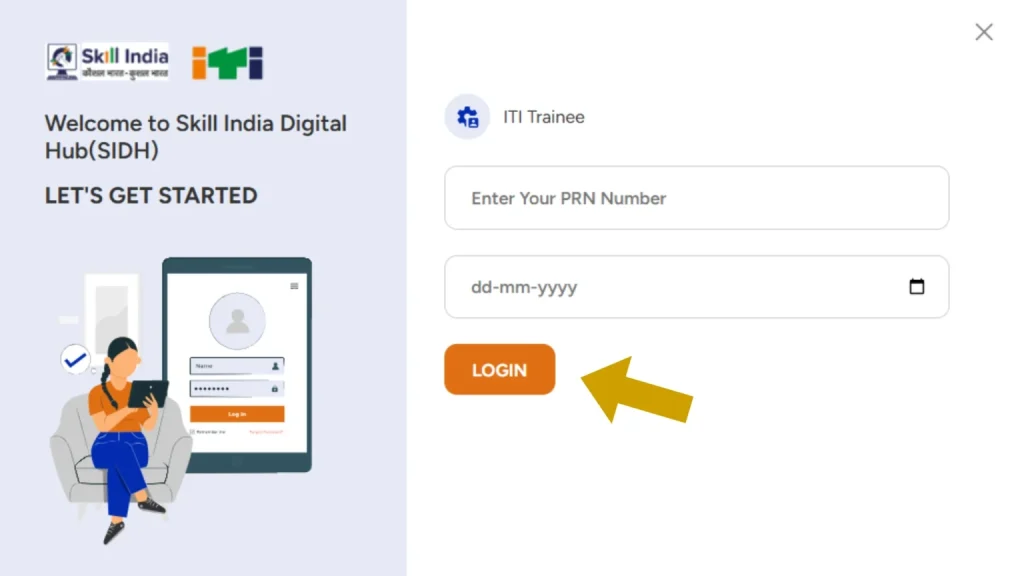
Step 3: The login page will open, where you need to enter your PRN Number and Date of Birth, then tap on the Login button.
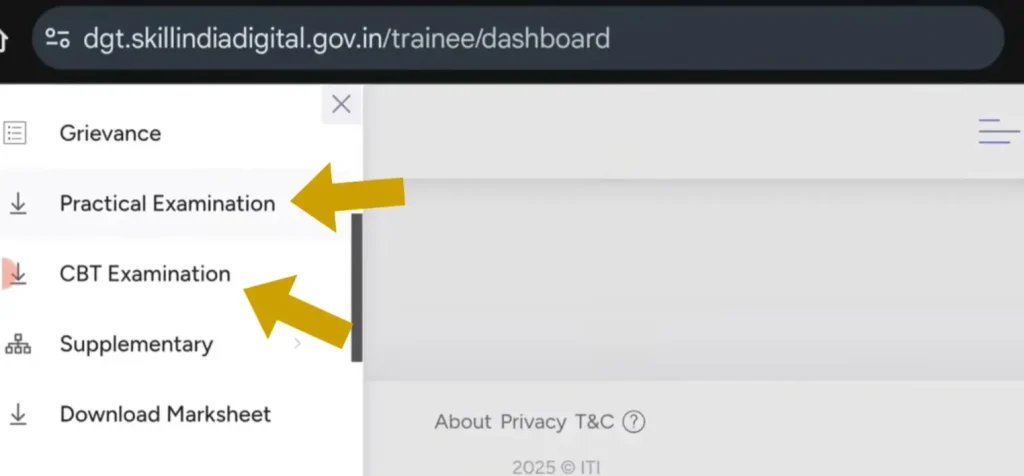
Step 4: Once you are logged in, your trainee dashboard will be displayed. Tap on the menu icon (☰) located at the top-right corner. From the menu, select the link for either the Practical Exam or CBT Exam as per your requirement.
Step 5: Your trainee profile will now be displayed on the screen. Scroll down slightly until you find the three-dot menu located under the “Action” column. Click on this menu, and you will see options like ‘Download Practical Hall Ticket’, ‘Download CBT Hall Ticket’, and even the ITI Result download link.
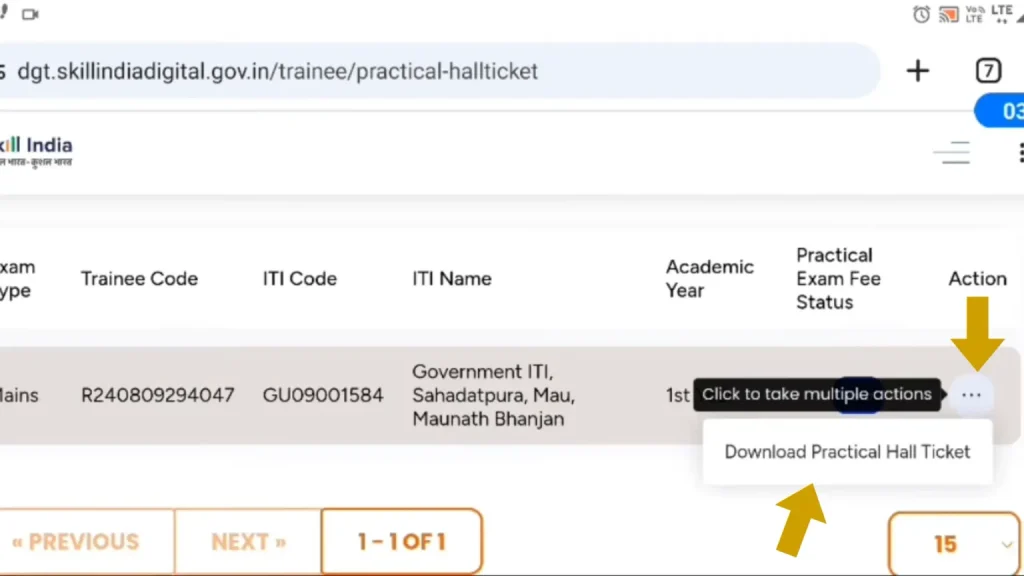
Step 6: Click on the desired download option, and your Practical or CBT ITI Hall Ticket 2026 will be automatically downloaded to your device in PDF format. You can also Check or download their NCVT Result form there.
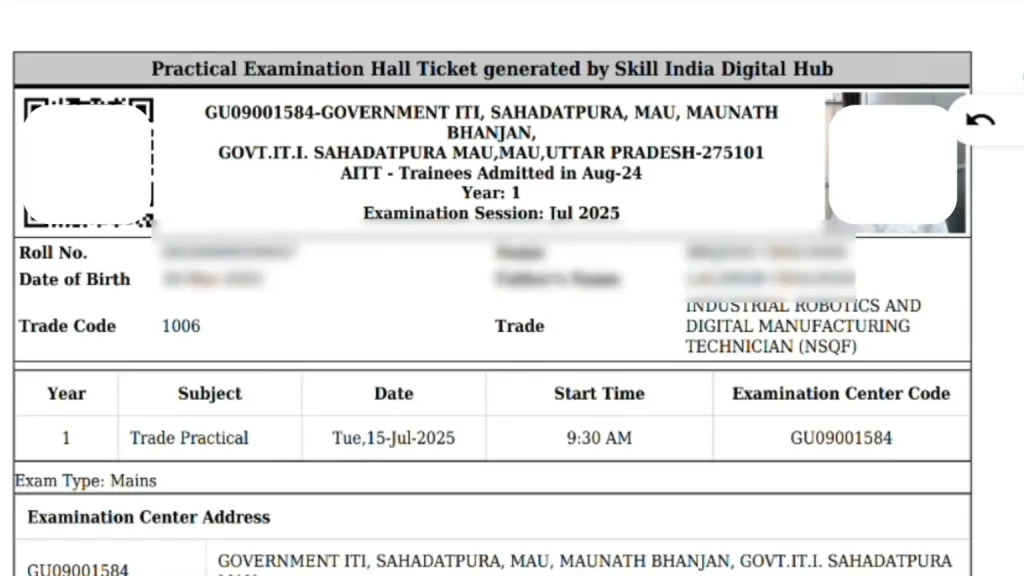
Step 7: Now, your Practical & CBT ITI Hall Ticket 2026 will display on your mobile screen.
Method 2: Download via the NCVT Website
Step 1: Open your web browser and type ncvtmis.gov.in in the search bar, then press Enter.
Step 2: On the homepage, click on the “Trainee” option in the top menu.
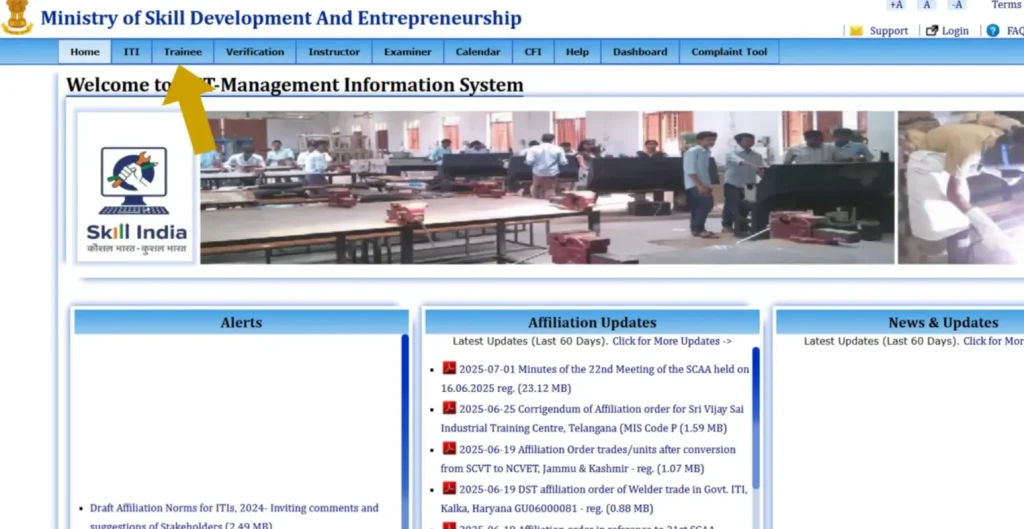
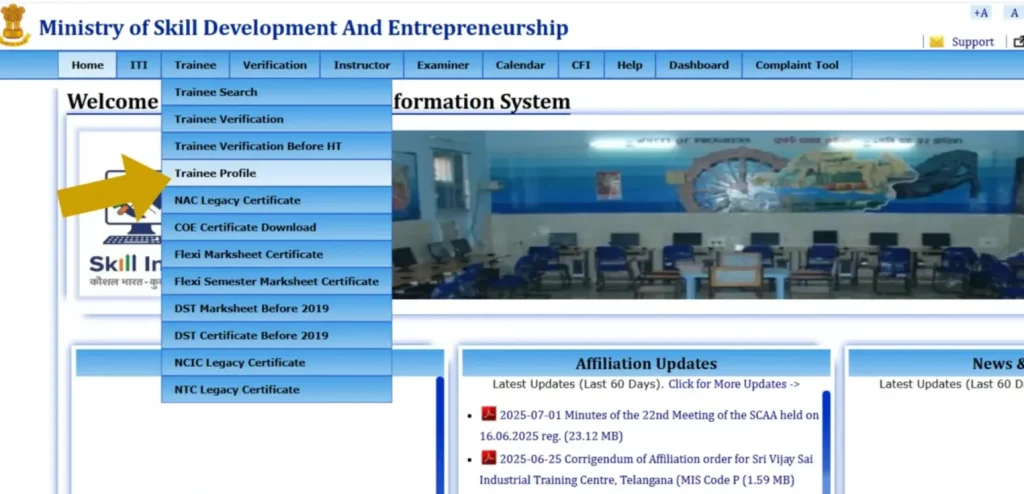
Step 3: From the drop-down menu, click on the “Trainee Profile” option.
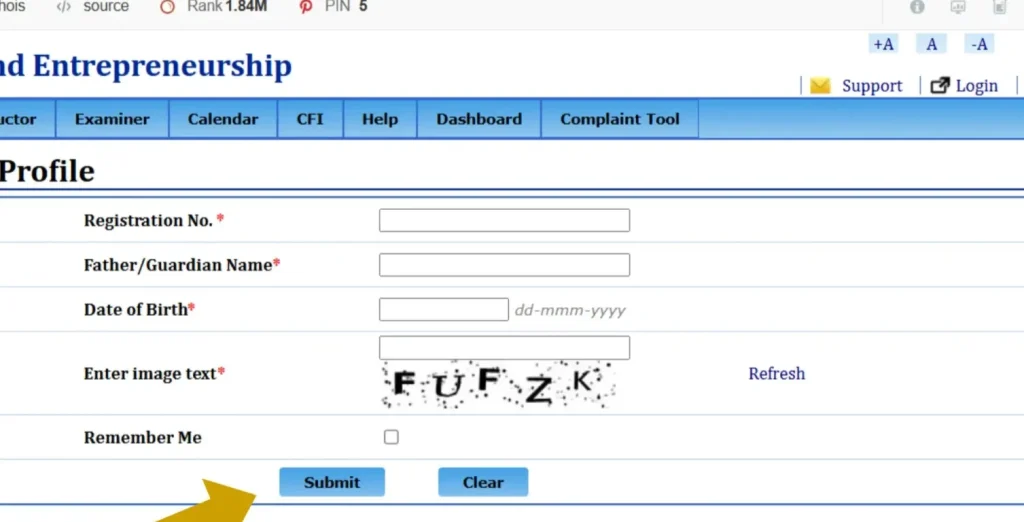
Step 4: A new page will open. Enter your Registration Number, Father’s Name, and Date of Birth, then click on the Submit button.
Step 5: Now, you can see or download their NCVT Admit card 2026.
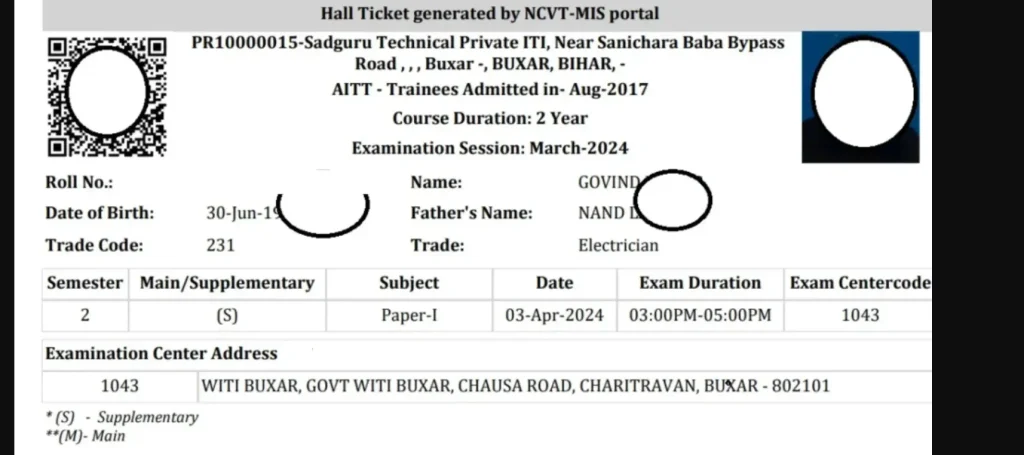
Details Mentioned on NCVT ITI admit card
After downloading your ITI admit card 2026, it’s very important to check all the details printed on it. If there is any mistake in your information, contact your training center immediately to get it corrected.
Here are the main details that will be mentioned on your NCVT ITI admit card:
- Student’s Full Name
- Roll Number and Registration Number
- Trade Name (example: Electrician, Fitter, etc.)
- Year and Semester (1st Year / 2nd Year)
- Exam Type (Practical or CBT)
- Exam Date and Time
- Exam Center Name and Address
- Candidate’s Photograph and Signature
- Instructions for the Exam Day
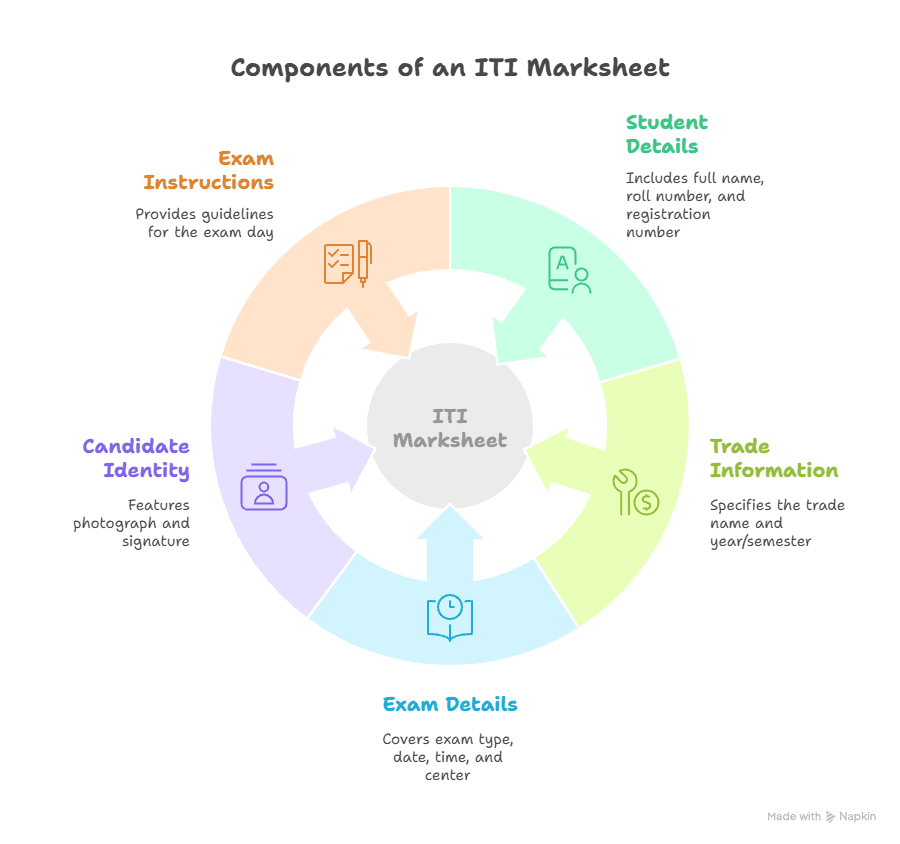
Make sure your photo and details are clearly visible. Also, follow all the rules mentioned on the ITI hall ticket 2026 during the exam.
Bringing the correct admit card is compulsory without it, you won’t be allowed to sit in the exam.
What to Do If Admit Card Is Not Available
Sometimes students face problems while downloading their NCVT ITI admit card 2026. If your admit card is not showing or you’re unable to download it, don’t panic follow these steps:
Check the Release Date
Make sure the admit card has been officially released. Sometimes students try to download it before it’s live on the portal.
Recheck Your Details
Enter your roll number, registration number, or date of birth correctly. A small mistake can stop the download.
Try Again Later
The website may be slow due to heavy traffic. If it doesn’t work, wait a few minutes and try again.
Clear Cache or Use Another Browser
Sometimes the browser causes problems. Try using Chrome, Firefox, or open in incognito mode.
Contact Your ITI Center
If nothing works, go to your ITI training institute. They can help you with downloading or correcting the admit card.
Call the Official Helpline
You can also contact the NCVT MIS support team through their helpline or email given on ncvtmis.gov.in.
Make sure to solve the issue before exam day. Without your ITI hall ticket 2026, you will not be allowed to sit in the exam.
Important Instructions for NCVT mis Admit Card 2026
Once you download your NCVT ITI admit card 2026, you must follow the instructions printed on it. These rules are important for a smooth and fair exam process.
Here are some key points to remember:
Carry the Admit Card:
Bring a printed copy of your ITI hall ticket 2026 to the exam center. Without it, you won’t be allowed to enter.
Bring a Valid ID Proof:
Along with your admit card, carry a valid photo ID like Aadhar card, PAN card, or college ID.
Reach Early:
Try to reach the exam center at least 30 minutes before the reporting time to avoid any last-minute issues.
Follow Dress Code:
Wear simple clothes. Avoid wearing anything that looks suspicious or has too many pockets.
Don’t Carry Banned Items:
Mobile phones, smart watches, notes, calculators, and any kind of cheating material are strictly not allowed.
Follow Instructions of Staff:
Listen to the instructions given by the exam center staff and behave properly in the exam hall.
Check Your Details:
Before the exam starts, confirm that your admit card details like name, photo, exam date, and center are correct
Make sure to solve the issue before exam day. Without your ITI hall ticket 2026, you will not be allowed to sit in the exam.
State-Wise ITI Admit Card Download Links
Students often search for state-specific portals to download their ITI admit card 2026. Below are some important links for different states where you can check or download your admit card:
- Uttar Pradesh ITI Admit Card – scvtup.in
- Bihar ITI Admit Card – bceceboard.bihar.gov.in
- Maharashtra ITI Admit Card – admission.dvet.gov.in
- Haryana ITI Admit Card – itiharyanaadmissions.nic.in
- Rajasthan ITI Admit Card – dte.rajasthan.gov.in
- Madhya Pradesh ITI Admit Card – iti.mponline.gov.in
Make sure to visit only the official website of your state ITI department. Login with your correct details and download the hall ticket on time.
Contact Details for Admit Card Support
If you’re facing problems while downloading your NCVT ITI admit card 2026, you can contact the help team or your institute. Here’s what you can do:
- Contact your ITI Training Center – Visit or call the institute where you’re enrolled.
- NCVT MIS Helpdesk:
- Website: ncvtmis.gov.in
- Email: ncvtmis@dgt.gov.in
- Website: ncvtmis.gov.in
- Phone: 0120-4405026
- Skill India Support:
- Website: ncvtmis.gov.in
- Support Section: Click on “Help” or “Contact Us” at the bottom of the page
Always keep your registration number, roll number, and mobile number ready when contacting support. This helps resolve your issue faster.
Conclusion
Downloading your ITI admit card 2026 is a must before appearing in the exam. Whether you are in 1st year or 2nd year, make sure to use the correct portal either ncvtmis.gov.in or skillindiadigital.gov.in and enter your details carefully.
Always check your admit card properly after downloading. Look at your name, roll number, exam center, and other details. If anything is wrong, contact your ITI center without delay.
Also, don’t forget to take a printout of the admit card, and carry it along with a valid ID proof on exam day. Following the rules and instructions will help you avoid last-minute problems